Why is my text search slow?
Leading wildcards break index seeks. Here's why, and how a full-text catalog solves it.
TL;DR — A leading wildcard (
LIKE '%foo%') forces SQL Server to scan every row, even with an index on the column, because there’s nowhere in a B-tree to seek to. Full-text catalogs fix this by indexing the words in a column, not the string prefix. Below: why the scan happens, how to prove it, and how to swap inCONTAINS.
Have you ever tried to index a text field but SQL server just won’t use it? In this blog post, we’re going to talk about how to solve that problem using a full text catalog.
Setting the scene
I’m using StackOverflow 2013 database provided by Brent Ozar and the team at Stack Overflow. You can follow his blog post here to get it yourself: https://www.brentozar.com/archive/2015/10/how-to-download-the-stack-overflow-database-via-bittorrent/ and I want to be able to search for posts by title. Let’s just say we want to just get the first 10 posts with a title that matches our query string.
Let’s take a look at the Posts table
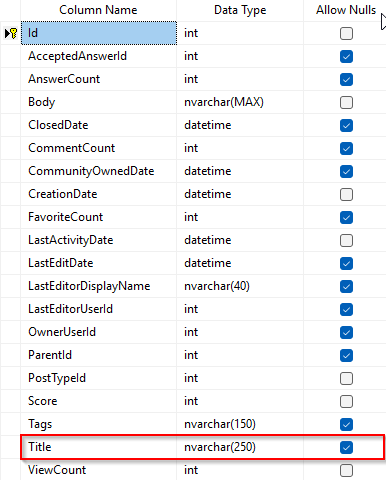
Along with various other fields, you can see that Posts has title field with a nullable nvarchar(250). Let’s turn on the actual execution plan and run our query (yes, SELECT * — forgive me, this is a demo):
SELECT top 10 p.Title, *
FROM Posts p
WHERE p.Title like 'Sql Server%'
(In production I’d add an ORDER BY — with TOP 10 and no ordering, “which 10” is nondeterministic. For a demo we just want to see the plan.)
And we end up with a clustered index scan because the table only has one index, a clustered index on the Posts table.
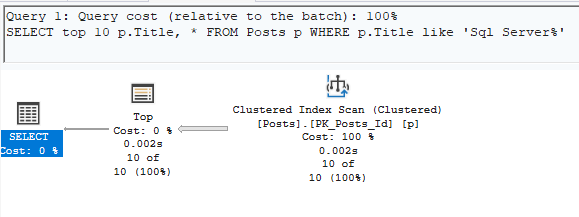
This results in
CPU Time:         0ms
Query time:      49ms
Logical reads: 1462
We can do better! Let’s add an index to the posts table that covers this title column.
CREATE INDEX IX_Title
ON Posts(Title)
And now let’s run our query again
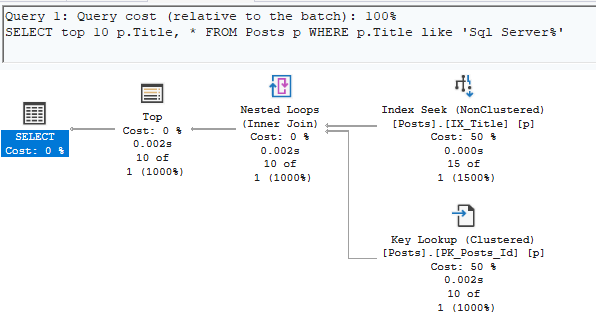
This results in
CPU Time:       0ms
Query time:    53ms
Logical reads: 44
Yes this results in some key lookups that we could get rid of by including other fields in the index but we’re no longer scanning the clustered index and logical reads are a fraction of what they were before!
But what if we change our query a bit? Let’s include a wildcard at the start of our query text instead of just the end.
SELECT top 10 p.Title, *
FROM Posts p
WHERE p.Title like '%Sql Server%'
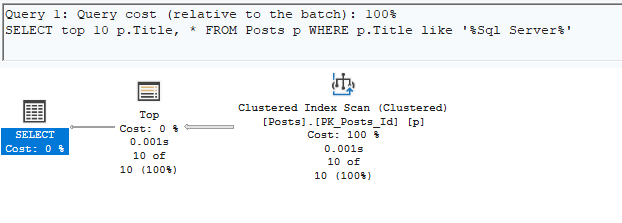
Oh no! We’re back to a clustered index scan. But we have a covering index don’t we? Why isn’t SQL Server choosing to use it? Stupid SQL Server. Let’s force it!
SELECT top 10 p.Title, *
FROM Posts p WITH(INDEX(IX_Title))
WHERE p.Title like '%Sql Server%'
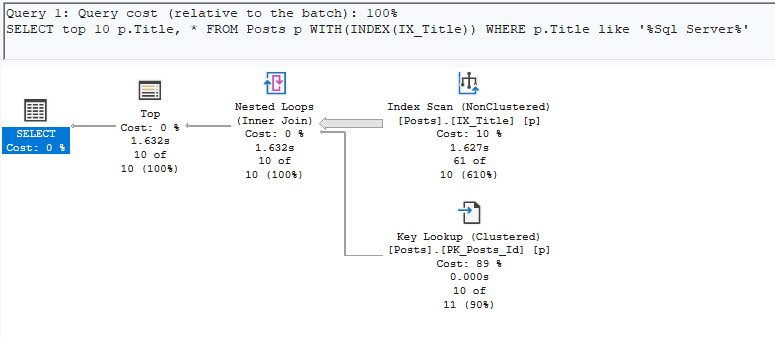
This results in
CPU Time:       1609ms
Query time:     1685ms
Logical reads: 14208
Wow. An index scan(not a seek like before). Maybe SQL Server knows what’s its doing when it decides to scan the clustered index instead of the index. But why? Why is this not working? Well the answer is that when you have a wildcard at the start of your query, it stops SQL from being able to index seek directly to the node in the B-tree then read sequentially.
Well you can think of your index like this. An ordered list starting with NULL then alphabetically ordered. And when its like this, SQL can seek to the Sql Server node in the index and read it. But when you have a wildcard at the beginning, Sql Server doesn’t know where to start.
If you want to see the ordering for yourself, run this — you’ll get NULLs first, then titles alphabetized. That’s the shape SQL Server needs a starting point in.
SELECT TOP 100 p.Title
FROM Posts p
WHERE p.Title IS NOT NULL -- Get results that are not null
ORDER BY p.Title
With a leading %, there’s no starting point to seek to — hence the scan.
Full Text Catalogs
The solution to this is a full text catalog. Full text catalogs let you search through all the text in a column quickly and the best thing about them, wildcards work!
First things first, run this to make sure you have this feature installed and it should result in a 1. If it doesn’t you’ll need to install that feature which is outside the scope of this blog post.
SELECT SERVERPROPERTY('IsFullTextInstalled');
Now let’s create a full text catalog. This will create a container where your catalogs will live. Specifying AS DEFAULT makes it so that when you create full text indexes without specifying the catalog, they’ll end up in here.
CREATE FULLTEXT CATALOG ftCatalog AS DEFAULT;
Now that we have a place to create the full text indexes, let’s create one! The only gotcha here is that the table you’re creating the full text index on needs to have a unique index.
CREATE FULLTEXT INDEX ON dbo.Posts (Title)
    KEY INDEX PK_Posts_Id   -- name of the unique index (PK)
    ON ftCatalog
    WITH CHANGE_TRACKING AUTO;    -- keeps index updated automatically
A couple of caveats worth knowing before you rely on this:
KEY INDEX PK_Posts_Idabove assumes your PK is named that — substitute the name of your table’s unique index.- Full-text index population is asynchronous.
CHANGE_TRACKING AUTOkeeps it up to date, but a row you just inserted may not be searchable for a moment. CONTAINSmatches on word boundaries, not substrings.LIKE '%MSSQLServer%'would match a run-together string;CONTAINS(p.Title, '"SQL Server"')will not.- Common words (“the”, “a”, etc.) get filtered as stopwords by default. Short queries can return surprising results.
And now that your full text is created, we can query it! You just need to change the syntax a bit. Using the CONTAINS function tells SQL to use the full text index.
SELECT top 10 p.Title, *
FROM Posts p
--WHERE p.Title like '%Sql Server%'
WHERE CONTAINS(p.Title, '"Sql Server"')
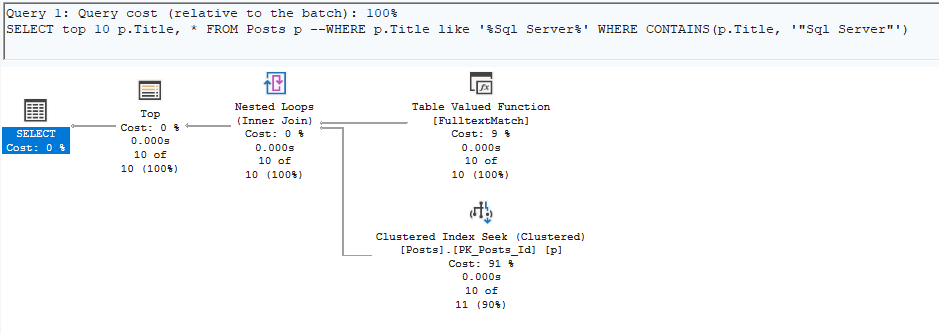
This results in
CPU Time:      16ms
Query time:    49ms
Logical reads: 45
Now you’re off and rolling! You’ve successfully created a text catalog and efficiently queried it! Congratulations!
When NOT to reach for full-text
Full-text search isn’t free. Before you drop it into every string column:
- Storage and maintenance overhead. The catalog is a separate structure that needs to be populated and maintained. On a wide, hot table this isn’t trivial.
- Word-boundary matching changes semantics. If your users legitimately need substring matches inside strings (product SKUs, log lines), full-text won’t do what LIKE does.
- Language and stopword configuration matters. The default word breaker is language-specific. If you’re indexing mixed-language content or short technical strings, tune this deliberately.
- Small tables don’t need it. If a clustered scan reads a few thousand pages and finishes in a couple of milliseconds, adding a full-text index is complexity for no user-visible win.
The right question isn’t “can I use full-text here?” — it’s “is the leading-wildcard scan actually hurting me, and is the workload’s search shape one full-text is good at?”
Working with me
If you found this blog post helpful and would like to work with me, shoot me an email!