Your SQL Server Is Slow. The First 4 Things I Check
Is your SQL Server slow? It's not a mystery, it's a checklist. The first 4 things I check on any slow server: wait stats, blocking, top queries, and indexing.
Is your SQL Server slow and you don’t know why? Good news: slow is almost never a mystery — it’s a checklist. Before you start randomly adding indexes or throwing hardware at the problem, here are the first four things I check on any server that’s dragging, and the free scripts I use to check them.
A set of scripts I use is the First Responder Kit. These scripts just make your life easier. In my day job, I have these scripts sitting in their own database and I call them like this: DBATools..SP_BlitzFirst
Wait Stats - what is the server waiting on?
I’m biased here. There are a lot of great scripts out there but the First Responder Kit is my choice because it was the first one I learned. So using this kit, the only thing I’m going to point you to is running this.
SP_BlitzFirst @Seconds = 5, @ExpertMode = 1
This will take 5 seconds to run and generate a bunch of different result sets. For wait stats, I want you to look at the second set of results.
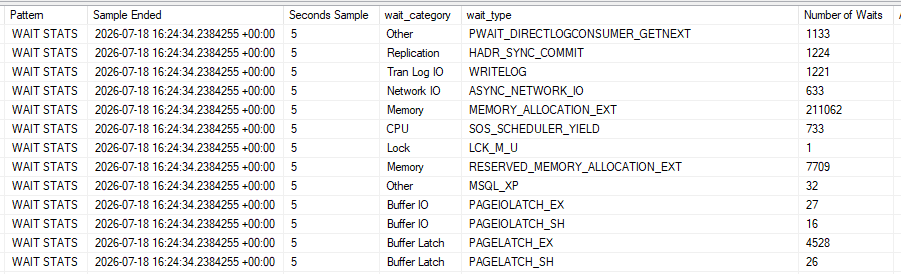
Here you can see what is causing the most contention, in this server above, the biggest number of waits is coming from MEMORY_ALLOCATION_EXT which is a bad example. Other scripts exclude this but this one means queries are waiting on memory to be allocated. Since nearly every query allocates memory, it’s best to ignore it.
Next is HADR_SYNC_COMMIT meaning this is running in an availability group set to Synchronous. Nothing you can really do here. It’s set to synchronous for fail-over purposes.
And we get down to PAGELATCH_EX. This is a memory latch contention issue that you may be able to do something about. If you have a high insert table with an IDENTITY column that is auto incrementing, you’ll probably get this wait type.
Imagine you and I are both trying to insert a new row, you get there first and insert a new row with identity 1 but I also want to insert a new page. You’re slow, so it takes you 5 seconds to insert a page so I’ll spend five seconds waiting for you to release your lock on the table, resulting in PAGELATCH_EX wait time.
There are ways to alleviate this by changing your identity column to something not right-leaning but that comes with a bunch of other potential issues
Blocking and contention — is it stuck rather than slow?
There are some built-in stored procedures you could run to get some fine grained system information but they have a lot of noise.
Try running
sp_who
sp_who2
to see what I mean.
But the script I use for diagnosing blocking and contention is
EXEC DBATools..Sp_BlitzWho
from the First Responder Kit because it filters out the noise.
Here is a result set of running this on a server I manage. I’ve blurred a few things for privacy’s sake.

You can see a bunch of goodies this script gives us. How long things are running for, their session id, and if they’re actively being blocked by another session.
Top resource-consuming queries — who’s actually eating the server?
Based on your wait types from earlier, you can use this query with a sort order to get the biggest offending queries.
EXEC DBATools..sp_BlitzCache @SortOrder = 'CPU' --Other sort orders 'reads', 'duration', 'executions'
For example,
CXPACKET / CXCONSUMER waits, you would want to sort by CPU because those waits are specific to CPU.
PAGEIOLATCH_SH / PAGEIOLATCH_EX you would sort by reads because these waits are waiting on data pages to come from disk.
Indexing on those queries — are they missing the right index or fighting the wrong one?
Our next first responder kit tool. I default to using @Mode = 4 but you can experiment and find the one that suits your situation best. @BringThePain = 1 so I get all the output
DBATools..sp_BlitzIndex @DatabaseName ='StackOverflow2013', @Mode = 4, @BringThePain = 1
I spammed my local database with a few bad queries to get some results to show up
SELECT * FROM Users WHERE DisplayName = 'Community'

SELECT * FROM Users where Location = 'Seattle, Washington'
And you can see it tells you a bunch about different problems the server is having

Sometimes the problem isn’t a missing index at all — it’s a query written in a way that can’t use the index you already have. A classic example is a text search with a leading wildcard. I wrote a full walkthrough on why your text search is slow and how a full-text catalog fixes it.
Working with me
If you found this blog post helpful and would like to work with me, shoot me an email!